

1095-B Forms are Now Available on the GHP Claims Information Site
The NTCA Group Health Program is now providing 1095-B tax forms online through the GHP Claims Information Site. Moving to digital access helps reduce printing and mailing costs while making it easier for participants to retrieve their forms when needed.
What Is Form 1095-B?
Form 1095-B is an IRS tax form that shows participants and their dependents had minimum essential health coverage during the tax year, as required under the Affordable Care Act (ACA).
Key Things to Know
- Purpose: The form reports qualifying health coverage to the IRS. While there is no longer a federal penalty for not having coverage, some states (including California and New Jersey) and the District of Columbia still enforce individual coverage mandates.
- Who Provides It: Form 1095-B is issued by the health coverage provider—not typically by the employer. This may include insurance carriers, government programs (Medicaid, Medicare, CHIP), or small self-insured employers.
- Keep for Your Records: Retain the form with tax documents in case proof of coverage is requested by the IRS or your state. Participants do not need to attach Form 1095-B to their federal tax return or wait for it to file their taxes. An individual can self-attest to having coverage.
- A Note on Form 1095-C: If the IRS identifies your company as an Applicable Large Employer (ALE) because you have more than 50 full-time employees, you must provide 2025 healthcare information to individual taxpayers on Form 1095-C by March 2, 2026. The due dates for filing with the IRS are February 28, 2026, for paper filers and March 31, 2026, for electronic filers. If your company is an ALE and you would like a Form 1095-C report to assist you with your 1095-C filing obligations, please contact NTCA Compliance at [email protected] to request a report.
- Filing Taxes: It’s a good idea to remind your employees that individual taxpayers do not have to wait to receive their Form 1095-B or 1095-C to file a federal tax return. The information on these forms may assist in preparing a return, but is not required to complete the return.
How to Access the 1095-B Form
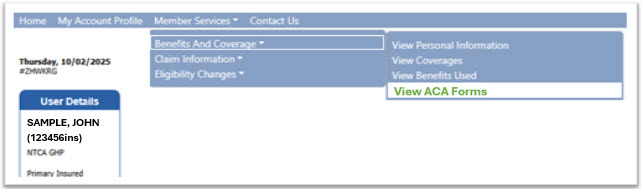
Log in your account at www.ntca.org/MyGHPClaims. In the top navigation menu, go to Member Services, select Benefits and Coverage, and click View ACA Forms. Choose the applicable plan year, click Search for ACA Forms, then download the 1095-B form as a PDF. See below for these easy navigation steps.

Additional Resources
1095-B Form Frequently Asked Questions
Sample GHP Participant Email:
Copy and paste the following text into an email to your GHP participants. Be sure to include any personal information, as indicated by red text with yellow highlight.
Your 1095-B form for the 2025 year is now available on the NTCA GHP Claims Information Site at www.ntca.org/MyGHPClaims. This is the first year these forms are accessible through this online portal, giving you faster, more convenient access to this important document.
What is it? All individuals enrolled in qualifying health coverage during the tax year receive a Form 1095-B. The form shows you and your dependents had minimum essential health coverage during the tax year.
Why do you need it? While you do not need to attach Form 1095-B to your federal tax return or wait for it to be filed, you should keep it with your tax records, as it helps verify you met the Affordable Care Act's (ACA) requirement to have health insurance.
How to access it — To access your Form 1095-B for the 2025 year:
- Log in to your account at www.ntca.org/MyGHPClaims
- Go to Member Services in the top navigation menu
- Select Benefits and Coverage
- Click View ACA Forms
- Choose the applicable plan year
- Click Search for ACA Forms
- Download the 1095-B form as a PDF
Questions? Check out NTCA's 1095-B Form FAQs, or reach out to me at {insert your contact information}.